Open source

Know which Claude Code
session needs you.

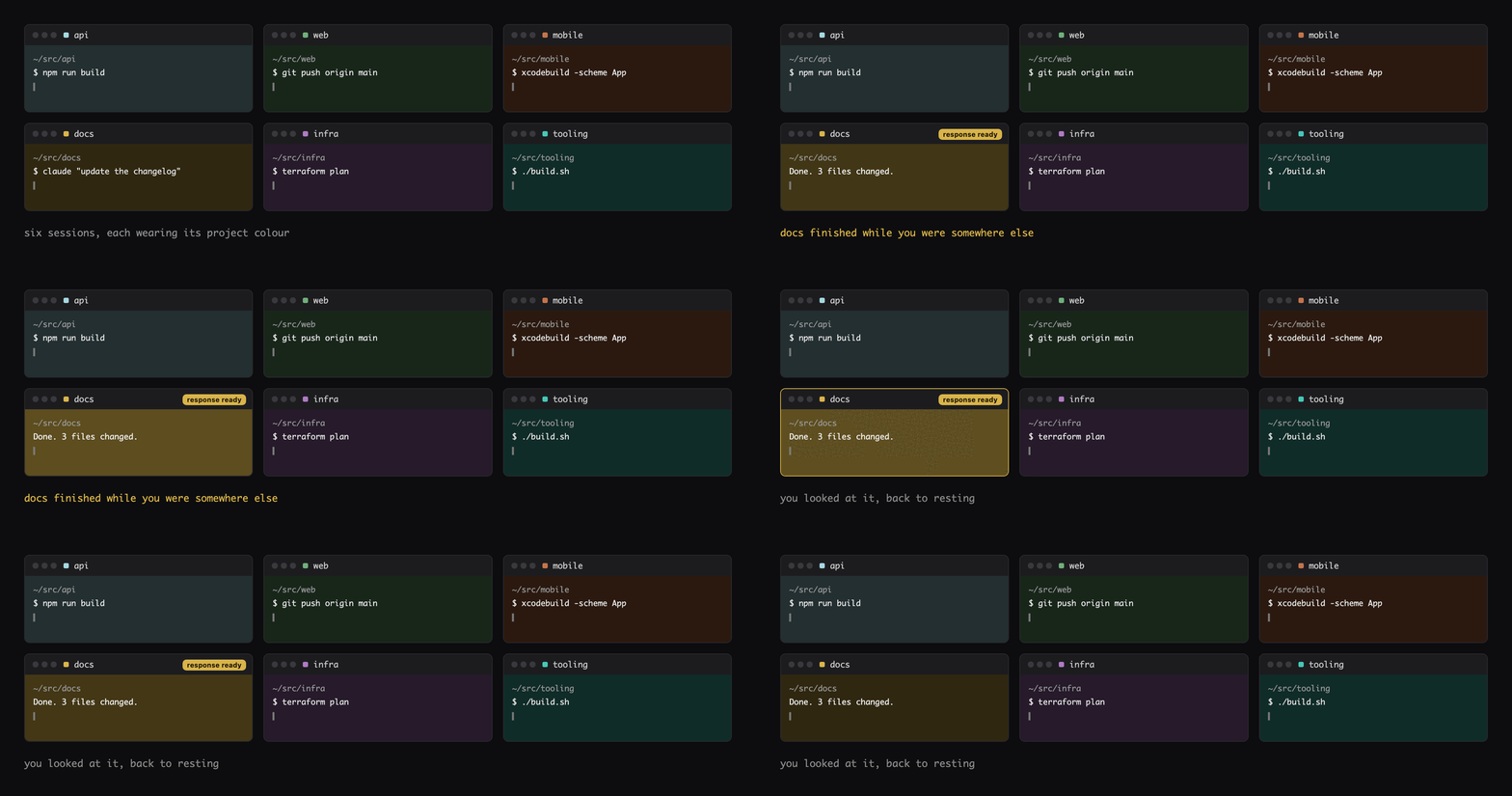
Eight terminal windows open. One of them finished forty seconds ago. This tints every window by project and brightens the one that is waiting on you.

If you run one Claude Code session, you do not need this. If you run eight, you are currently alt-tabbing through all of them to find the one that stopped.

/plugin marketplace add dotcomjack/claude-session-tint
/plugin install claude-session-tint@dotcomjack

Requires macOS and Claude Code. The window colouring is Terminal.app only. The zero-turn command works in any terminal, on any OS.

Six Terminal windows, each tinted a different colour by project, with the window that just finished shown brighter than the rest.
Six windows, six projects, six colours. The one that just finished is the bright one.

What it does

Colour is the only channel that still works when you are not reading the screen.

Tint by project

Every window gets a colour from a palette file you own, keyed to the project. Same project, same colour, every session. The palette lives at ~/.claude/tabtint-palette.conf, outside the plugin folder, because a plugin update replaces the plugin folder wholesale and would take your colours with it.

Brighten on unread

When a response lands in a window you are not looking at, that window brightens. Focus it and it drops back within a second.

A dot on the tab

Terminal draws only the selected tab's body, so painting a background tab is invisible exactly when you need it. An unread background window gets a marker in front of its tab title instead.

Terminal support, honestly

Half of this is macOS Terminal.app only, and I would rather you read that here than find it in an issue.

Terminal.app cannot colour a tab. I enumerated every property on its tab class before writing a line of this: the only colour properties all paint the content area, never the tab chrome. Real per-tab colour is an iTerm2, kitty and Ghostty capability. That constraint is the reason this tool exists in the shape it does.

So the window colouring runs on macOS Terminal.app and silently does nothing anywhere else. If you use iTerm2, Ghostty or kitty you probably do not want that half, because those terminals already have native tab colours.

The part below is terminal-agnostic and OS-agnostic, and it is the part worth reading.

The part worth stealing

You can run a command from the Claude Code input box without invoking the model.

No turn, no tokens, no assistant message in the transcript. Type ,api at an idle prompt and it runs. This is a UserPromptSubmit hook, it is about a hundred lines, and it has nothing to do with terminals.

The hook returns this and exits 2:

{ "decision": "block", "reason": "text shown to you, verbatim",
  "hookSpecificOutput": { "hookEventName": "UserPromptSubmit", "suppressOriginalPrompt": true } }

Four things about that are not obvious.

  • Exit 2 is required, not optional. Exit 0 lands in a branch that reports the outcome as success and appends a spurious "completed" line. Exit 2 skips it, and decision "block" has already set the blocking error, so your text is never replaced by a wrapped stderr dump.
  • A bare exit 2 cannot suppress the echo. Without suppressOriginalPrompt the blocked line is appended back into the transcript as "Original prompt: ,api". That is why the hook emits JSON instead of just exiting.
  • An async hook silently cannot gate anything. The async flag's own schema says the hook runs in the background without blocking, so its result arrives after the prompt already reached the model. Nothing warns you.
  • Fail open, always. Anything that is not a comma line exits 0 untouched, and so does every failure path. This must never eat a real prompt.

The limit: the gate only fires on a prompt submitted at an idle input box. Type ,api while a turn is already running and the text is delivered to the model mid-turn, never reaches UserPromptSubmit, lands in the transcript as an ordinary prompt, and costs a turn. That is a property of the hook, not of this script.

Measured against Claude Code 2.1.224 on 2026-08-07. Claude Code ships roughly one release a day, so check it against your build before you rely on it. MIT.
Limits

The short list of things I know are missing.

  • It does not colour tabs, because Terminal.app cannot. Outside macOS Terminal.app the colouring half no-ops silently rather than erroring.
  • It cannot tell you when your profile has "Custom title" switched off, which is the one setting that stops the dot appearing. AppleScript cannot read that checkbox. If the dot never shows up, check that first.
  • It makes no network calls and writes no prompt text to disk. The UserPromptSubmit hook does receive every prompt you type, which is inherent to that hook type. It pattern-matches and discards.
  • The installer merges into your settings.json rather than replacing it, writes a backup first, validates the result as JSON before writing, and is safe to re-run.

Install

Two lines.

/plugin marketplace add dotcomjack/claude-session-tint
/plugin install claude-session-tint@dotcomjack

Restart Claude Code and open a second project. The windows separate on their own.

If you build something on this pattern, I want to see it.

The zero-turn hook is the useful half and it is not mine in any meaningful sense, it is just written down. My inbox is open: jack@dotcomjack.com. I read and answer everything myself.